















-
Why Buy PlayStation Gift Cards with Bitcoin and Crypto
A PSN gift card is the cleanest way to move crypto onto Sony's American storefront when you don't have a US-issued card to attach to your account. Sony's billing system restricts foreign payment methods on the US Store, so a crypto-funded gift card sidesteps that wall entirely. Cardstorm runs the order on-chain, Sony never sees a payment method, and you don't pass any verification on our end either. Bitcoin, Ethereum, USDT, and 250+ other coins are accepted at checkout.
-
What You Can Buy on the US PlayStation Store
When you buy PlayStation gift card with crypto, the credit lands in a US PSN wallet with access to the American Store catalog. That covers:
- Full games and add-on content priced in USD, with US Store sales running on a different cycle than EU and Japan
- PS Plus Essential, Extra, and Premium. The Premium tier in the US includes a Classics catalog of PS1, PS2, and PSP titles
- In-game currency: V-Bucks, FIFA Points, Apex Coins, COD Points, GTA Shark Cards, Destiny Silver
- Movie and TV rentals licensed for the US region
- PS5 and PS4 themes, avatars, and account top-ups for digital pre-orders
A PSN account set to the UK, Germany, France, or Japan will reject the code with a region-mismatch error. The card only works on US PSN.
-
Available PlayStation Gift Card Denominations
Four denominations are in stock: $25, $50, $75, and $100. Each code adds its face value to your PSN wallet at a 1:1 USD rate. A $75 card credits exactly $75. Stack multiple codes on one account if you want a custom balance, and let the wallet draw down on its own across future Store purchases. PSN wallet credit doesn't expire and doesn't reset between PS Plus billing cycles.
-
How to Redeem Your PSN Code on PlayStation
You can redeem the PSN gift card at PlayStation Store on a PS5 or PS4 console, in the PlayStation App, or in a web browser:
- Sign in and select your profile.
- Select Redeem Code.
- Enter the 12-digit code from the Cardstorm email.
The USD amount is added to the US PSN wallet.
-
Supported Cryptocurrencies
Cardstorm accepts 250+ coins for PlayStation gift card orders, including: Bitcoin (BTC), Ethereum (ETH), Tether (USDT on both TRC-20 and ERC-20), USD Coin (USDC), Solana (SOL), TRON (TRX), Litecoin (LTC), BNB, Dogecoin, and most major stablecoins, Layer 1s, and Layer 2 tokens. The exchange rate is locked at order confirmation, so anything that happens on-chain between checkout and email delivery stays out of the USD value.

Buy PlayStation Gift Card with Crypto
Buy PSN gift card with crypto and fund a US PlayStation account without a US-issued bank card and without passing KYC. The code redeems on the US PlayStation Store and credits your wallet one-to-one in USD. Gift card denominations come in $25, $50, $75, and $100. You can order with Bitcoin, Ethereum, USDT, or 250+ coins and tokens supported on Cardstorm. Get your gift card with crypto today and receive it in your email within minutes.
You can redeem the PSN gift card at PlayStation Store on a PS5 or PS4 console, in the PlayStation App, or in a web browser: 1. Sign in and select your profile.
2. Select Redeem Code.
3. Enter the 12-digit code from the Cardstorm email. The USD amount is added to the US PSN wallet. Eligibility and use: • Redeemable only by users aged 18 or older holding an adult account for PSN registered to the U.S.
• PSN wallet funds can be used by the redeeming account holder and their child Family Member accounts to pay for items in the PS Store available to U.S. account holders.
• The code is valid for one time use only.
• The card is not redeemable for cash, cannot be returned for cash or credit, and may not be resold, exchanged, or used for any other purpose. PS Plus subscriptions renew automatically at the then-current PS Store price plus applicable tax until you cancel. If your wallet has insufficient funds, your account's default payment method will be charged. Full terms: www.playstation.com/legal/ps-plus-usage-terms/.
- You can redeem your gift card at PlayStation Store on your PS5 or PS4 console, PlayStation App, or web browser.
- Sign in and select your profile, followed by Redeem Code.
- Just enter the 12-digit code and you’re ready to go.
See Also








How to buy gift card with crypto
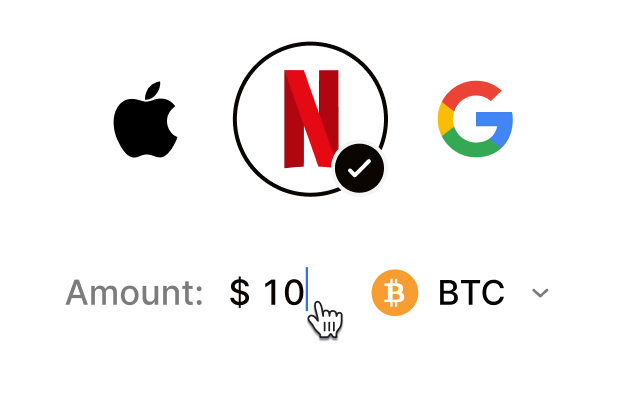 Choose your e-gift cardSelect any brand, amount, and token
 Pay safely with cryptoNo KYC required. Secure payments through our crypto checkout
 Instantly receive a voucher code via emailGet full instructions on how to redeem it
 Redeem & enjoySpend crypto on real goods and come back to Cardstorm
FAQ
- Cardstorm is a marketplace for buying gift cards with cryptocurrency. We offer a secure, fast, and private way to convert your crypto into a wide variety of gift cards. Choose a brand and the correct country/region, select your amount, pay with crypto at checkout, and receive your gift card details according to the delivery method shown on the product page.
- Cardstorm offers a wide selection of digital gift cards. Popular options include Amazon, Visa, Spotify, Netflix, PlayStation, Xbox, and Sephora. Availability can vary by country/region, so choose the correct location (for example, US) or use search to see the most up-to-date list.
- Yes. Cardstorm supports 200+ cryptoсurrencies. You can buy gift cards with different cryptos including Bitcoin, Ethereum, USDC, USDT, Binance Pay, Litecoin, Dogecoin, Lightning, or Lifi. The available cryptocurrencies can vary, so check the checkout page to see the current list of supported coins and networks.
- No. Cardstorm does not require KYC/ID verification to place an order. You only need an email address so we can deliver your digital product after purchase.
However, some products (especially prepaid cards) may require identity verification at the redeeming or usage stage (for example, when you activate the card or use it with the issuer). When this applies, it’s clearly stated in the product description. - Because digital gift cards are delivered electronically and can be redeemed instantly, refunds are often limited. Check Cardstorm’s Refund Policy and the product page terms. If you believe there’s an issue (invalid code, wrong delivery, etc.), contact support with your order details.
- After your payment is confirmed, delivery is typically within a few minutes to the email address you provide. If there’s a delay, we’ll notify you promptly and help resolve it – by offering an alternative or a refund where applicable, according to the product terms.
- First, confirm you purchased the correct country/region and followed the redemption steps for that brand. If the issue persists, contact [email protected] and include your order number, screenshots (if possible), and any error messages from the redemption page.
- If you don’t see your question answered here, email us at [email protected] – we’ll be happy to assist.