














-
Why Buy Subway Gift Cards with Crypto
Subway does not accept cryptocurrency, so a gift card is the only way to pay at Subway restaurants using crypto. Through Cardstorm, you can turn BTC, ETH, or USDT into a Subway restaurant gift card and spend that balance on food at any US Subway location. The balance never expires and Subway charges no fees against it. You can also link the card to a Subway MyWay Rewards account, so every dollar you spend from the gift balance earns points toward future rewards.
-
Where Subway Accepts Gift Cards in the US
Subway accepts the gift card at participating restaurants across the US (around 20,000 locations), on subway.com, and inside the Subway App.
-
Subway Gift Card Denominations
Cardstorm sells the Subway gift card in six USD values: $5, $10, $25, $50, $75, and $100. The amount you pick at checkout is the full balance loaded onto the card.
-
Supported Cryptocurrencies
You can pay with Bitcoin (BTC), Ethereum (ETH), Tether (USDT), USDC, BNB, Solana (SOL), TRON (TRX), Litecoin (LTC), Dogecoin (DOGE), and 250+ other cryptocurrencies at checkout.

Buy Subway Gift Card with Crypto
Buy Subway gift card with crypto and pay at US Subway restaurants or on subway.com and Subway app. Cardstorm carries Subway cards in the following denominations: $5, $10, $25, $50, $75, $100, and allows you to top up your subway balance with BTC, ETH, USDT, or 250+ other coins without KYC. Receive the code by email within minutes after transferring the crypto.
To redeem your Subway gift card: 1. After purchasing the card, open the email from Cardstorm and copy the card number (and PIN, if listed) or save the card details.
2. To use in-store, hand the card to a Sandwich Artist at any participating US Subway restaurant and ask them to scan it at the register. The cashier deducts the order total from the card balance.
3. To use online, go to subway.com or open the Subway App, build your order, and proceed to checkout.
4. On the payment step, choose "Use a gift card", then enter the card number and PIN when prompted.
5. Place the order. For app pickup, allow about 15 minutes before collecting it at the selected Subway restaurant.
In-store:
- Visit a participating Subway restaurant.
- Have a Sandwich Artist scan your gift card at the POS terminal.
- The value of the gift card will be deducted from your purchase.
Online:
- Visit the Subway website or open the Subway app.
- Place your order.
- During the checkout process, select “Add a gift card” or “Use a gift card” as a payment method.
- Enter the gift card number and PIN (if required) as prompted.
- The value of the gift card will be deducted from your purchase.















How to buy gift card with crypto
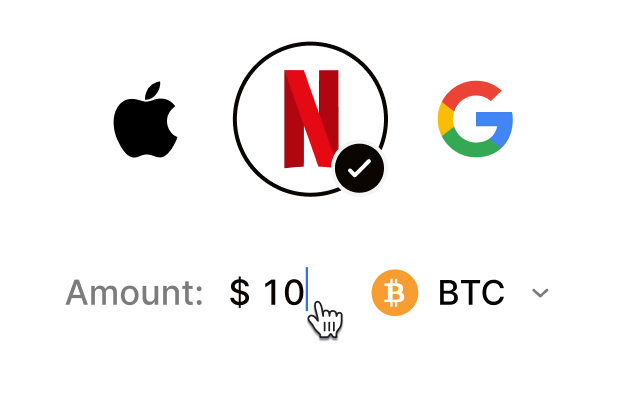 Choose your e-gift cardSelect any brand, amount, and token
 Pay safely with cryptoNo KYC required. Secure payments through our crypto checkout
 Instantly receive a voucher code via emailGet full instructions on how to redeem it
 Redeem & enjoySpend crypto on real goods and come back to Cardstorm
FAQ
- Cardstorm is a marketplace for buying gift cards with cryptocurrency. We offer a secure, fast, and private way to convert your crypto into a wide variety of gift cards. Choose a brand and the correct country/region, select your amount, pay with crypto at checkout, and receive your gift card details according to the delivery method shown on the product page.
- Cardstorm offers a wide selection of digital gift cards. Popular options include Amazon, Visa, Spotify, Netflix, PlayStation, Xbox, and Sephora. Availability can vary by country/region, so choose the correct location (for example, US) or use search to see the most up-to-date list.
- Yes. Cardstorm supports 200+ cryptoсurrencies. You can buy gift cards with different cryptos including Bitcoin, Ethereum, USDC, USDT, Binance Pay, Litecoin, Dogecoin, Lightning, or Lifi. The available cryptocurrencies can vary, so check the checkout page to see the current list of supported coins and networks.
- No. Cardstorm does not require KYC/ID verification to place an order. You only need an email address so we can deliver your digital product after purchase.
However, some products (especially prepaid cards) may require identity verification at the redeeming or usage stage (for example, when you activate the card or use it with the issuer). When this applies, it’s clearly stated in the product description. - Because digital gift cards are delivered electronically and can be redeemed instantly, refunds are often limited. Check Cardstorm’s Refund Policy and the product page terms. If you believe there’s an issue (invalid code, wrong delivery, etc.), contact support with your order details.
- After your payment is confirmed, delivery is typically within a few minutes to the email address you provide. If there’s a delay, we’ll notify you promptly and help resolve it – by offering an alternative or a refund where applicable, according to the product terms.
- First, confirm you purchased the correct country/region and followed the redemption steps for that brand. If the issue persists, contact [email protected] and include your order number, screenshots (if possible), and any error messages from the redemption page.
- If you don’t see your question answered here, email us at [email protected] – we’ll be happy to assist.